


Ever block off an hour for a “sure thing” discovery call, then watch the clock tick past start time? No-shows don’t just waste time, they break your focus and your week. A strong call-booking funnel fixes this by turning “I might show up” into “I’m committed.” It’s a small system: a clear booking page, a thank-you page that sets expectations, a calendar event that removes friction, reminders that feel helpful, and pre-call questions that get buy-in.
If you’re building a coaching offer as a Side Hustle (or scaling a Home Base Business to Make Money Online), this is one of the highest-return setups you can do once and benefit from for years.
The funnel map that prevents no-shows (before reminders even start)
No-shows usually aren’t about rude people. They’re about low commitment and high friction.
Commitment drops when the call feels optional, unclear, or “salesy.” Friction rises when the prospect can’t find the link, forgets the time zone, or doesn’t know what will happen on the call.
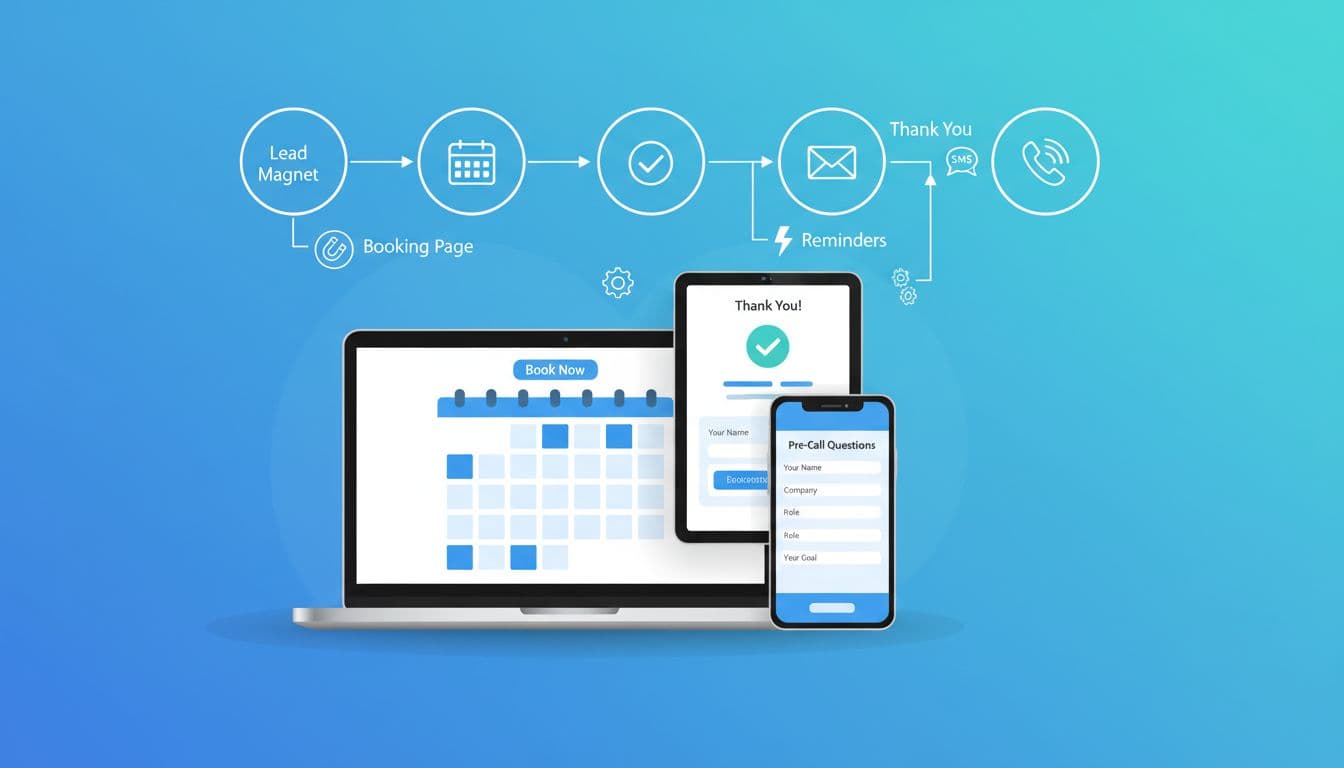
A no-show resistant funnel is a simple chain:
Booking Page → Thank-You Page → Calendar Event → Reminders → Pre-Call Questions → Call
Treat it like an airline boarding process. When people get a ticket, instructions, and a few prompts, they show up at the gate. When they get “see you then,” they forget.
If your coaching is part of a bigger income plan, pair this funnel with a simple weekly action schedule. This fits well with a realistic plan like a 90-day side hustle roadmap so your lead flow and your calendar stay steady.
A booking page and thank-you page that make people feel “locked in”
What your booking page must do (in plain language)
Your booking page has one job: make the call feel specific and worth attending. That means three things: who it’s for, what happens, and what to bring.
Use this short copy pattern and adjust the words to your offer:
Booking page headline: Book Your 15-Minute Fit Check
Subhead: This is a quick call to see if I can help you (and if the next step makes sense).
What we’ll cover (2 lines): We’ll pinpoint the main bottleneck, map a simple next step, and decide if we meet again.
Who it’s for: Coaches and service pros who want more consistent leads without adding chaos.
Before you book: Please book only if you can attend live. If something changes, reschedule using the link in your confirmation.
The thank-you page is where no-shows get cut in half
Most people send prospects to a dead-end “thanks” screen. That’s a missed moment. Your thank-you page should reduce uncertainty and add a small micro-commitment.
Include: (1) confirmation, (2) one clear next step, (3) what to expect, (4) reschedule rules.
Thank-you page headline: You’re booked, here’s what to do next
Step 1: Add this to your calendar (use the button below).
Step 2: Answer the quick pre-call questions (takes 2 minutes).
What to expect: I’ll call you at the scheduled time. This is a real conversation, not a pressure pitch.
If you need to change times: Please reschedule at least 4 hours ahead so I can offer the slot to someone else.
If you use Calendly, their built-in workflows make this easy to automate. For a quick overview, see Calendly Workflows for before and after meetings.
Reminder timing that boosts show-up rate (without annoying people)
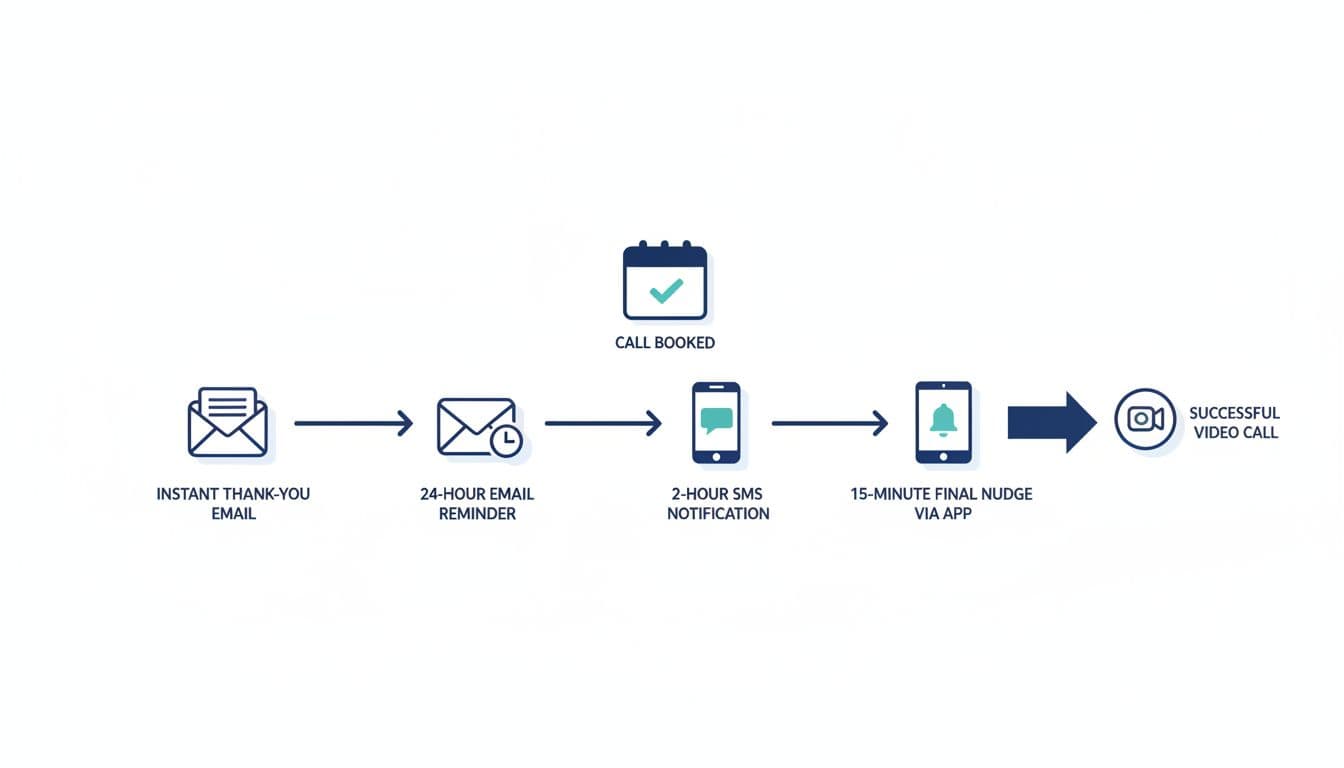
Reminders work best when they do two things: reduce confusion and invite a clean reschedule. If someone can’t make it, you want them to move the call, not ghost you.
Here’s a practical default schedule:
| When | Channel | Purpose |
|---|---|---|
| Instant | Confirm time, link, expectations | |
| 24 hours | Reconfirm, share pre-call questions | |
| 2 hours | SMS | Simple “still good?” nudge + link |
| 15 minutes | SMS | Join link + “see you soon” |
For a deeper walk-through on reminder types, see Calendly’s guide to reducing no-shows with reminders.
Variations for different sales cycles
If your lead is warm (referral, inbound, podcast listener), keep reminders lighter. If your lead is cold (DM outreach, ads), keep reminders clearer and add one extra “confirm” step.
- Warm leads: Instant email, 2-hour SMS, 15-minute SMS.
- Cold leads: Instant email, 24-hour email, 2-hour SMS (confirm), 15-minute SMS.
- Longer cycle (high-consideration): Add a “prep email” right after booking with a short agenda and one case study link.
Copy you can use (email + SMS)
Instant confirmation email (subject): Confirmed: Your call is booked
Body: You’re all set for (Day) at (Time) (Time Zone). Here’s your link: (Link).
Quick note: please join from a quiet spot if possible. If something changes, use this reschedule link: (Reschedule).
See you then, (Name)
24-hour email reminder (subject): Quick reminder for tomorrow
Body: Still good for (Day) at (Time)?
If you haven’t yet, please answer the pre-call questions here: (Form Link). It helps us get straight to the point.
2-hour SMS: Hey (First name), this is (Name). We’re still on for (Time) today. Reply YES to confirm, or use this link to reschedule: (Reschedule)
15-minute SMS: Starting soon. Here’s the link: (Link). If tech acts up, reply here and I’ll help.
Pre-call questions, automation, and the simple tech stack (plus common pitfalls)
Pre-call questions do more than qualify. They create investment. When someone answers even a few questions, they’re more likely to show up because they’ve already “started.”
Pre-call questionnaire (short version, 2 minutes)
- What made you book this call today?
- What result are you aiming for in the next 90 days?
- What’s your biggest obstacle right now?
- On a scale of 1 to 10, how urgent is this?
Pre-call questionnaire (long version, deeper fit)
- What are you doing now to get leads?
- What’s working, even a little?
- What’s not working, and why do you think that is?
- What offer are you selling (and at what price)?
- What’s your monthly revenue goal?
- What does your schedule look like (hours per week you can commit)?
- Have you invested in coaching or tools before? What did you like and dislike?
- If we find a fit, are you ready to take action in the next 7 days?
Simple tech stack (beginner-friendly)
- Scheduler: Calendly or Acuity (time zones, buffers, reschedule rules).
- CRM (optional but helpful): HubSpot, so every booking becomes a contact and pipeline stage.
- Email: your ESP (or Gmail to start).
- SMS: a texting tool, or the scheduler’s built-in SMS if available.
- Automation: Zapier or Make to tag contacts, send forms, and log answers.
This is where Automation pays off. You stop chasing confirmations and start focusing on the call itself. If you’re scaling and doing a Team Build (a setter booking calls for you, or a small sales team), this stack also keeps handoffs clean.
Common pitfalls and quick fixes
Time zones: Always display time zone on booking and reminders, and include a one-click “add to calendar.”
Too many reminders: If prospects complain, remove one touch, keep the 2-hour and 15-minute texts.
Weak thank-you page: If show rate is low, add a “Reply YES to confirm” step on the thank-you page.
No reschedule path: Every reminder should include reschedule, because life happens.
Printable-style checklist (keep this simple)
- Booking page states who it’s for, what happens, and what to bring
- Thank-you page includes next steps and reschedule rules
- Calendar invite includes link, time zone, and agenda line
- Instant confirmation email is active
- 24-hour reminder is active (or removed for warm leads)
- 2-hour SMS includes “reply YES” confirmation
- 15-minute SMS includes the join link
- Pre-call questions are required (short or long)
- Form answers go to your CRM or inbox automatically
- No-show follow-up message is ready
KPI tracking table (watch these weekly)
| KPI | What “good” looks like | Where to track | Quick note |
|---|---|---|---|
| Booking conversion rate | 20% to 45% | Page analytics + scheduler | Depends on traffic quality |
| Show rate | 70% to 90% | Scheduler | Below 70% needs fixes |
| Reschedule rate | 10% to 25% | Scheduler | Healthy if it prevents ghosts |
| Pre-call form completion | 80%+ | Form tool | Low rate means friction |
| Close rate | Varies by offer | CRM | Track by lead source |
| No-show follow-up recovery | 10%+ rebooked | CRM | One good message helps |
Conclusion
No-shows drop when your funnel feels like a clear process, not a casual suggestion. Tighten the booking page, make the thank-you page do real work, keep reminders helpful, and use pre-call questions to create commitment. When your calendar becomes predictable, your marketing gets calmer too, and that’s how a sustainable call booking funnel supports your income goals.